Amaya needs to be activated once with your Envato purchase code. Activation unlocks:
- Demo import — install any of the demo websites with one click
- The Amaya Features plugin — the bundled plugin that powers the theme’s custom blocks
- Plugin updates — future updates of the Amaya Features plugin
Where do I find my purchase code?
- Log in to ThemeForest with the account you used to buy the theme.
- Open your Downloads page (click your username → Downloads).
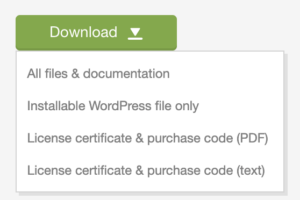
- Find Amaya in the list and click the Download button next to it.
- Choose License certificate & purchase code. The certificate is a text file — your purchase code is the long code that looks like this:
86781236-23d0-4b3c-7dfa-c1c147e0dece
How to activate
- In your WordPress admin, go to Appearance → Amaya Activation.
- Paste your purchase code into the Purchase code field.
- Click Activate theme.
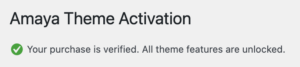
That’s it. You’ll see a confirmation message, and the page now shows your
license information. The Import Demo Content and Install Plugins
buttons take you straight to the next setup steps.
Your License Information
After activation the page shows:
- Active Websites — the websites activated with your purchase code.
Use Check Again to refresh the list.
One regular license covers one website. A development, staging or localhost copy of that website is fine and doesn’t count as a second site. If you want to build a second website with Amaya, please purchase another license on ThemeForest.
Moving your website?
If you move to a new domain or rebuild the site, activate the theme again on the new installation — same steps, same purchase code. On the old site you can click Remove purchase code from this site on the activation page first.
Troubleshooting
“This purchase code could not be verified.”
Double-check for typos or extra spaces — the code must look like 86781236-23d0-4b3c-7dfa-c1c147e0dece.
Make sure you copied it from the Amaya entry in your Downloads (a code from another theme won’t work).
If it still fails, contact us through the support page and include your purchase code.
“The verification service is temporarily unavailable.”
Our verification server couldn’t be reached — this is usually a short hiccup. Nothing was changed on your site; simply try again in a few minutes. If it persists for hours, contact support.
I dismissed the activation notice — where do I activate now?
The activation page is always available under Appearance → Amaya Activation.
Privacy
Activating the theme sends your purchase code, site domain and theme version to redsun.design solely to verify the purchase and to list your activated websites on the activation page; no other data is transmitted.